
How to simplify authentication in any application with an authentication proxy ?
With our main partner please-open.it, we implement authentication solutions for applications across various languages and frameworks. Over the years, we’ve encountered the same challenges repeatedly: authentication is complex to integrate, session management is often misunderstood, and authentication concerns are tightly coupled with application code.
We are convinced that the authentication proxy pattern is by far the most efficient, effective, and simple approach to implement in enterprises. While this architectural pattern isn’t new, we wanted to make it more accessible. That’s why we built a ready-to-use solution based on OpenResty’s OIDC module—an authentication proxy that acts as a security gateway between users and backend applications.
Project: https://github.com/please-openit/authentication-proxy
The Authentication Integration Challenge
Why is Authentication Complex?
Integrating authentication into applications is rarely straightforward, regardless of the programming language or framework you’re using:
- Multiple protocols to understand: OAuth2, OpenID Connect, SAML each have their own specifications
- Security best practices: Token validation, secure storage, CSRF protection, and more
- Session management complexity: Handling session lifecycle, refresh tokens, logout propagation
- Framework-specific implementations: Each language/framework has its own authentication libraries with different APIs
- Testing difficulties: Authentication flows are hard to test in development environments
The Session Management Problem
One of the most common issues we see is poor session management. Many applications:
- Create their own session storage mechanisms (often insecure)
- Don’t properly validate tokens on each request
- Fail to implement proper session timeouts
- Don’t handle token refresh correctly
- Mix authentication state with application state
This leads to security vulnerabilities, inconsistent behavior, and maintenance nightmares.
Enter the Authentication Proxy Pattern
The authentication proxy pattern shifts authentication responsibility from the application to a dedicated component sitting in front of it. This architectural approach brings numerous benefits.
What is an Authentication Proxy?
An authentication proxy is a reverse proxy that:
- Intercepts all incoming requests before they reach your application
- Authenticates users via an identity provider (like Keycloak, Auth0, Okta)
- Manages sessions independently from your application
- Injects user information as HTTP headers to your backend
- Proxies authenticated requests to your application
Your application receives pre-authenticated requests with user information in headers—no authentication code required.
Our OpenID Connect Authentication Proxy
We’ve built an authentication proxy based on NGINX + OpenResty with Lua scripting that provides enterprise-grade authentication for any backend application.
Key Features
Full OpenID Connect Support
- Standards-compliant OIDC authentication
- Works with any OIDC provider (Keycloak, Auth0, Okta, Google, etc.)
- Automatic token validation and refresh
Define Public vs Private URLs
- Configure which URLs require authentication
- Public endpoints remain accessible without login
- Fine-grained access control per route
Claims-Based Header Injection
- Inject user information from OIDC tokens into HTTP headers
- Configure any token claim as a header (email, roles, tenant ID, etc.)
- Your backend receives
X-USER,X-EMAIL,X-ROLES, etc.
Optional Interstitial Page
- Display security information or terms of service before access
- Toggle on/off via feature flag
- Fully customizable HTML page
Lightweight and Efficient
- Based on NGINX/OpenResty – proven performance
- Redis-backed session storage
- Minimal resource footprint
- Scales horizontally
Simple Deployment
- Docker Compose ready
- Interactive configuration script
- Single configuration file (
lua/config.lua) - No compilation required
Architecture Overview
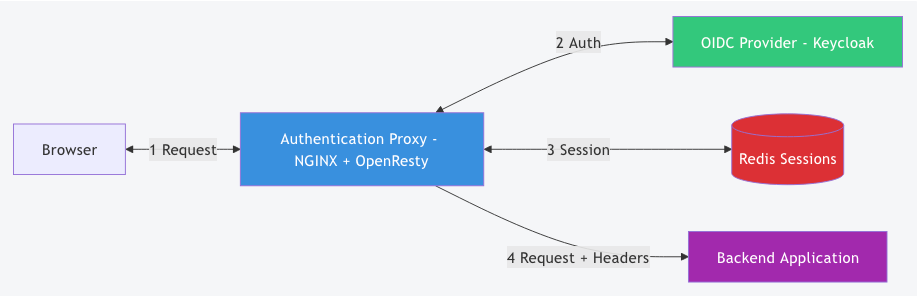
Components:
- NGINX/OpenResty: Web server with Lua scripting capabilities
- lua-resty-openidc: OpenID Connect library for Lua
- Redis: Session storage backend
- Lua Scripts: Authentication logic and header injection
- Backend Application: Your application (in any language)
How It Works
Authentication Flow
- User accesses the application (e.g.,
https://app.example.com/dashboard) - Proxy checks authentication:
- Session exists? → Continue to step 5
- No session? → Redirect to identity provider
- User logs in at the identity provider (Keycloak, etc.)
- Proxy receives tokens and creates a session in Redis
- Proxy injects headers from token claims:
X-USER: user-id-123
X-EMAIL: user@example.com
X-NAME: john.doe
X-ROLES: admin,editor
6. Request forwarded to backend with user context
Filtering on User Claims
The proxy can filter access based on user attributes from the OIDC token. For example:
-- Example: Only allow users with 'admin' role
if not has_role(res.id_token.roles, "admin") then
    ngx.status = 403
    ngx.say("Access denied: admin role required")
    return ngx.exit(403)
end
You can implement custom logic to:
- Restrict access by roles
- Filter by tenant/organization
- Validate custom claims
- Implement complex authorization rules
This Pattern is Universally Applicable
The authentication proxy pattern works for almost any application:
Language Agnostic
- Python (Django, Flask, FastAPI)
- Node.js (Express, NestJS)
- Java (Spring Boot, Quarkus)
- Go (Gin, Echo)
- Ruby (Rails, Sinatra)
- PHP (Laravel, Symfony)
- Legacy applications (even those without source code access!)
Architecture Compatible
- Monoliths
- Microservices
- Serverless functions (with some adaptations)
- Static sites with API backends
- Third-party applications (SaaS tools you can’t modify)
Use Cases
- Add authentication to legacy applications without code changes
- Protect internal tools with SSO
- Unify authentication across multiple applications
- Protect APIs with OIDC tokens
- Add MFA/2FA to any application (handled by identity provider)
- Implement custom authentication flows without touching app code
Separation of Concerns: A Better Architecture
One of the biggest advantages of this pattern is the clear separation between authentication and application logic.
Before (Coupled Architecture)
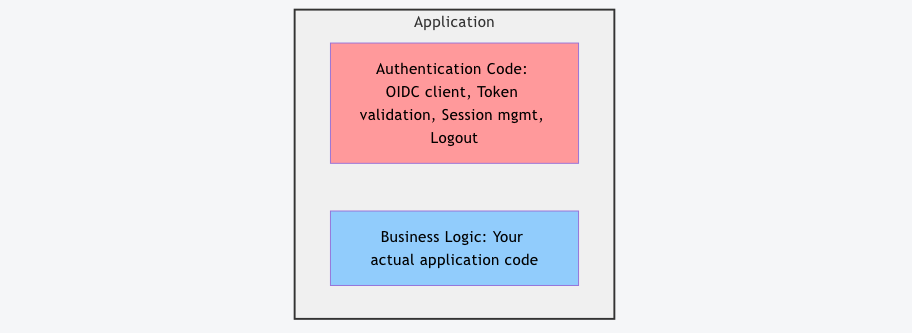
Problems:
- Developers must learn authentication protocols
- Authentication bugs affect the entire application
- Difficult to change authentication methods
- Hard to test business logic in isolation
After (Proxy Architecture)
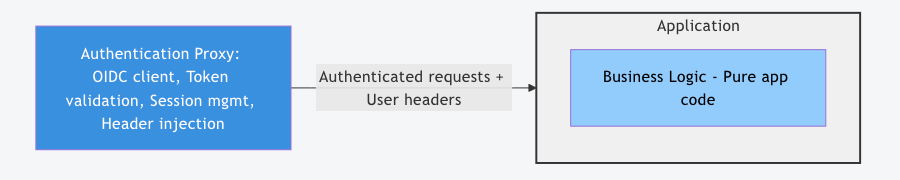
Benefits:
- Developers focus on business logic – no authentication code
- Security team owns authentication – proper separation of responsibilities
- Easy to change authentication – modify proxy config, not app code
- Consistent authentication – same mechanism across all apps
- Testable – test business logic without mocking authentication
Who Does What?
| Responsibility | Authentication Proxy | Application Team |
|---|---|---|
| User authentication | ✅ Proxy handles it | ❌ Not their concern |
| Session management | ✅ Proxy manages | ❌ Not their concern |
| Token validation | ✅ Proxy validates | ❌ Not their concern |
| User logout | ✅ Proxy handles | ❌ Not their concern |
| Business logic | ❌ Not proxy’s job | ✅ App team owns it |
| Authorization rules | 🤝 Shared (proxy filters, app decides) | 🤝 Shared |
This separation allows:
- Security/DevOps teams to configure and maintain authentication
- Development teams to focus on features
- Clear accountability for each layer
Total Freedom for Authentication Layer
Since authentication is handled by the proxy, you have complete freedom to configure it at the identity provider level:
Multi-Factor Authentication (MFA/2FA)
Add MFA without touching your application:
- SMS codes
- Authenticator apps (TOTP)
- Push notifications
- Hardware tokens (YubiKey, etc.)
- Biometric authentication
Configure it once in your identity provider (Keycloak), and all applications benefit.
Authentication Methods
Choose any authentication method:
- Username/password
- Social login (Google, Facebook, GitHub)
- Enterprise SSO (SAML, LDAP, Active Directory)
- Passwordless (magic links, WebAuthn)
- Certificate-based authentication
Conditional Access
Implement sophisticated access policies:
- Step-up authentication (require MFA for sensitive actions)
- Risk-based authentication (IP location, device fingerprinting)
- Time-based access restrictions
- Geo-fencing
Authentication Flows
Customize the authentication experience:
- Custom login pages
- Brand-specific themes
- Terms of service acceptance
- Privacy policy agreements
- Custom user registration flows
All of this without changing a single line of your application code.
Configuration Made Simple
Our proxy includes an interactive Python script that generates configuration:
./generate_config.py
The script asks:
- Enable interstitial page? (yes/no)
- OIDC discovery URL? (e.g.,
https://keycloak.example.com/realms/myrealm/.well-known/openid-configuration) - Client ID? (e.g.,
my-app) - Client secret? (e.g.,
secret123) - HTTP headers to inject? (e.g.,
X-USERfromsubclaim) - Backend URL? (e.g.,
https://backend.example.com)
It generates lua/config.lua:
local _M = {}

-- Feature flag to enable/disable the interstitial page
_M.interstitial_enabled = true

-- OpenID Connect configuration
_M.oidc = {
    ssl_verify = "no",
    redirect_uri = "http://localhost/cb",
    discovery = "https://keycloak.example.com/realms/myrealm/.well-known/openid-configuration",
    client_id = "my-app",
    client_secret = "secret123"
}

-- User headers configuration
_M.user_headers = {
    { name = "X-USER", claim = "sub" },
    { name = "X-EMAIL", claim = "email" },
    { name = "X-NAME", claim = "preferred_username" },
    { name = "X-ROLES", claim = "roles" },
}

-- Backend URL to proxy to
_M.backend_url = "https://backend.example.com/"

return _M
Deployment
Docker Compose (Development)
git clone https://github.com/please-openit/authentication-proxy
cd authentication-proxy
./generate_config.py
docker-compose up -d
Access your authenticated application at http://localhost
Production Deployment
Deploy the proxy in front of your application:
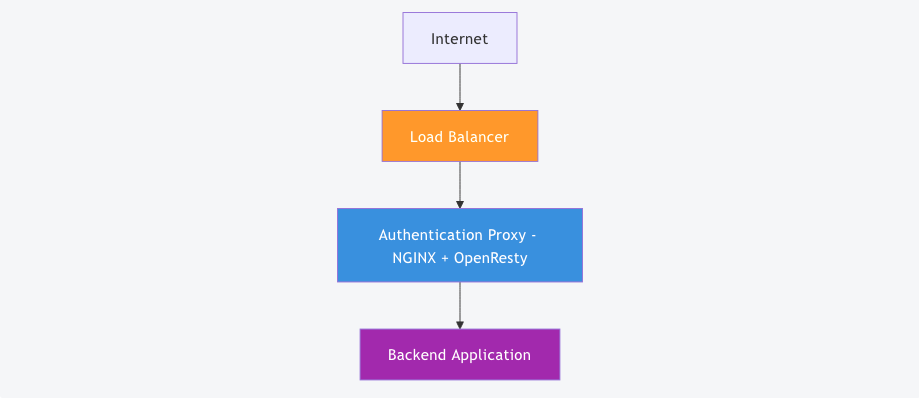
Requirements:
- Redis instance (for sessions)
- Identity provider (Keycloak, Auth0, etc.)
- SSL/TLS certificates (handled by load balancer or NGINX)
Kubernetes Example
apiVersion: apps/v1
kind: Deployment
metadata:
  name: auth-proxy
spec:
  replicas: 3
  template:
    spec:
      containers:
      - name: nginx
        image: your-registry/auth-proxy:latest
        env:
        - name: REDIS_HOST
          value: redis-service
      - name: redis
        image: redis:alpine
Resource Efficiency
The proxy is extremely lightweight:
- Memory: ~50-100MB per NGINX worker process
- CPU: Minimal overhead (mostly I/O bound)
- Latency: Adds < 10ms to request time
- Throughput: Handles thousands of requests/second
This makes it cost-effective even for high-traffic applications.
Real-World Use Cases
Case 1: Legacy Application Modernization
A client had a PHP 5.4 legacy application with custom authentication that didn’t support modern protocols.
Solution:
- Deployed authentication proxy in front
- Configured Keycloak as identity provider
- Application reads user from
X-USERheader - Added MFA without touching legacy code
Result: Modern authentication for a 10-year-old application in 2 days.
Case 2: Microservices Authentication
A client with 15 microservices in different languages needed unified authentication.
Solution:
- Single authentication proxy for all services
- Each service reads headers (
X-USER,X-TENANT) - Consistent authentication across the stack
- No authentication libraries in any microservice
Result: Simplified architecture, faster development, easier maintenance.
Case 3: Third-Party Tool Protection
A client needed to protect a self-hosted GitLab instance with their corporate SSO.
Solution:
- Authentication proxy in front of GitLab
- GitLab configured to trust
X-USERheader - Corporate SSO (Keycloak with LDAP) handles authentication
Result: SSO integration without modifying GitLab.
Comparison with Alternatives
| Approach | Pros | Cons |
|---|---|---|
| Authentication Proxy | ✅ Language agnostic ✅ No code changes ✅ Centralized auth ✅ Easy to change | ⚠️ Extra network hop ⚠️ Single point of failure (mitigated with HA) |
| Application-level Auth | ✅ No extra component ✅ Full control | ❌ Requires code changes ❌ Language-specific ❌ Duplicated across apps |
| API Gateway Auth | ✅ Enterprise features ✅ Centralized | ❌ Vendor lock-in ❌ Expensive ❌ Complex setup |
| Service Mesh Auth | ✅ Microservices-native ✅ Zero-trust | ❌ Kubernetes only ❌ Steep learning curve ❌ Resource intensive |
The authentication proxy strikes a balance: simple, effective, and flexible.
Limitations and Considerations
While powerful, the authentication proxy pattern has some limitations:
Not Suitable For:
- Public APIs with API keys – Use API gateway patterns instead
- Machine-to-machine authentication – Use client credentials flow directly
- Scenarios requiring fine-grained authorization – Combine with application-level authorization
Security Considerations:
- Header injection security: Ensure backend trusts only the proxy (network isolation or mutual TLS)
- Session storage: Redis should be secured and backed up
- High availability: Deploy multiple proxy instances behind a load balancer
- Token refresh: Handled automatically by
lua-resty-openidc
Getting Started
1. Clone the Repository
git clone https://github.com/please-openit/authentication-proxy
cd authentication-proxy
2. Configure Your Identity Provider
Create an OpenID Connect client in your identity provider (Keycloak, Auth0, etc.):
- Client type: Confidential
- Redirect URI:
http://localhost/cb(adjust for production) - Note the client ID and client secret
3. Generate Configuration
./generate_config.py
Answer the prompts with your OIDC provider details.
4. Start the Proxy
docker-compose up -d
5. Access Your Application
Navigate to http://localhost – you’ll be redirected to login, then back to your application with authentication.
Conclusion
The authentication proxy pattern simplifies authentication integration dramatically:
- No code changes in your application
- Works with any language or framework
- Separates concerns between security and development teams
- Centralized authentication across multiple applications
- Easy to deploy and maintain
- Flexible authentication methods at the identity provider level
- Lightweight and efficient resource usage
Our NGINX-based authentication proxy makes this pattern accessible to everyone. It’s open source, production-ready, and battle-tested.
Try it today: https://github.com/please-openit/authentication-proxy
We believe authentication should be simple, secure, and separate from business logic. The authentication proxy embodies these principles.
Have questions or need help implementing this pattern? Reach out to us at Janua – we specialize in authentication and authorization architectures.

Please-open.it is JANUA.FR's main partner. Specialised in IAM (security, access control, identity management) and Open Source integration, settled in 2004 by IAM industry veteran, Open-IAM (Janua.fr) offers high value-added products and services to businesses and governements with a concern for identity management and Open Source components.
Janua.fr, a trademark of Open-IAM is an IT services and business consultancy company, created in July, 2004, by SUN Microsystems identity management industry veterans. Janua IAM activity spinned-off in August 2025 to Open-IAM.
- Keycloak OAuth2-Proxy Configuration Generator: Simplify Your Reverse Proxy Authentication Setup - 26 janvier 2026
- Authentication Proxy: Simplify Authentication in Any Application - 24 décembre 2025
- How to make your custom workflow with Keycloak - 13 octobre 2025